


Key Takeaways
- Online tax software makes filing faster and easier, especially for folks with a simple return.
- TurboTax is popular but pushes pricey upgrades, promotes loans and credit cards, and hides fees behind confusing pricing.
- H&R Block offers solid free filing for simple returns and lets you get help in person, but more complex returns will cost you.
- Jackson Hewitt charges a flat fee for all returns, which is refreshingly simple—but there’s no free option.
- Ramsey SmartTax keeps things simple and honest with up-front pricing, no upsells and zero pressure to go into debt just to file your taxes.
For people with a relatively simple tax situation, using the right online tax software can make a world of difference when it comes to getting your taxes filed—without suffering too many headaches. Tax software has been around since the 1980s, and today it’s the go-to choice for millions of Americans. In fact, more than 150 million tax returns were e-filed using tax software in 2025 alone!1
Online tax software is popular for a reason. It’s convenient, budget-friendly, and walks you through the filing process step by step—making it a solid option even if you’re filing taxes for the first time. On top of that, most software programs offer different versions or add-ons, so you can choose the level of support you need.
With so many options out there, it’s smart to compare features and costs before choosing a platform. The right software depends on your tax situation—and how much help you want along the way.
Let’s take a look at five of the most popular online tax software options (in no particular order) and see which one might be best for you.
2026 Tax Software
TurboTax
TurboTax is one of the most widely used tax software programs available. It’s part of the Intuit family, which also includes QuickBooks, Credit Karma and Mailchimp. If you use QuickBooks or Quicken to track your business or personal expenses, you can import your data directly into your tax return.
Like most tax software, TurboTax saves your information from past returns so you can roll over your data each year. It also offers upgraded versions with live chat from a tax expert—but those extras come at a cost.
Pricing depends on the version you use and even when you file—and it can change without notice. You may also see a lower current price next to a higher “anticipated” price. The bottom line? Affordability and transparency are definitely not TurboTax’s strong points, folks.
You can file for free only if your return is very simple. Once you move beyond a basic W-2 and Form 1040—like itemizing deductions, reporting mortgage interest, or earning 1099 income—you’ll need to upgrade. From there, the minimum cost is $79 for federal filing, plus $64 per state return.2
And here’s another red flag: TurboTax makes money by steering users toward loans and credit cards through its parent company, Intuit. (Remember, one of Intuit’s companies is Credit Karma.) If you owe money to the IRS, TurboTax will conveniently offer you a loan to help pay your bill.
Getting a refund? TurboTax will graciously let you pay for their service with a portion of your refund—for an additional $40 service fee!3
Here’s a breakdown of TurboTax’s online filing options, starting with its most basic package:
|
Filing Option |
Features |
Cost to File Federal Return |
Cost to File for Each State Return |
|
Do It Yourself Free |
|
$0 |
$04 |
|
Do It Yourself Deluxe |
|
$79 |
$645 |
|
Do It Yourself Premium |
|
$139 |
$646 |
|
Expert Assist Basic |
|
$79 |
$597 |
|
Expert Assist Deluxe |
|
$129 |
$698 |
|
Expert Assist Premium |
|
$209 |
$699 |
H&R Block
H&R Block has been helping people file taxes since 1955. Today, it offers both do-it-yourself online filing and in-person help at offices across the U.S. You can meet with a tax advisor to ask questions or drop off all your tax forms and let them take care of the rest—for a price, of course.
When it comes to its online tax software, H&R Block keeps things pretty simple. The platform is easy to navigate, avoids all the heavy tax jargon, and walks you through your return step by step. Where H&R Block really stands out is its free tier. Unlike many competitors, H&R Block’s free version can handle specialized things like student loan interest deductions and retirement income.
Still, keep in mind that the free version only works for relatively simple tax situations. If you’re self-employed, own a home or business, or earn income from rental properties or investments, you’ll likely need to upgrade to a paid plan.
And that’s where things get a little tricky. H&R Block’s pricing isn’t very transparent—and that’s a red flag for us. We pulled the prices below from their website on January 27, but we’ve seen different prices depending on promotions and even how you get to the product page. When pricing changes based on where you click, it raises real questions about how up-front the company is about what you’ll pay.
Let’s take a look at H&R Block’s tax software options, starting with the freebie tier:
|
Filing Option |
Features |
Cost to File Federal Return |
Cost to File for Each State Return |
|
Free Online |
|
Free |
Free |
|
Deluxe |
|
$65 |
$37 |
|
Premium |
|
$105 |
$37 |
|
Self-Employed |
|
$130 |
$3710 |
Jackson Hewitt
Jackson Hewitt may not be as popular as TurboTax or H&R Block, but it’s still a name to be reckoned with in the tax prep game. Unlike most competitors, Jackson Hewitt offers just one package that covers all tax situations. It has a flat base fee of $25 for one federal return and unlimited state returns, which is like a breath of fresh air after trying to figure out TurboTax’s confusing mix of prices and fees.11
Another thing that sets Jackson Hewitt apart is its network of physical locations—many of them inside Walmart stores. That makes it easy to get face-to-face help if you want it, but in-person services typically come with an extra cost.
That said, there are a couple of trade-offs. Jackson Hewitt doesn’t offer a free version, even for very basic returns. And while its software is pretty straightforward, paying less often means getting less support. If you have a complicated tax return and need expert guidance, it’s worth paying more for peace of mind.
And here’s the deal, folks: Like TurboTax, Jackson Hewitt has started promoting credit with tax refund loans, such as its Early Tax Refund Advance. While getting part of your refund early might sound appealing, these are still loans—with estimated APRs as high as 35.99%.12 That’s called crazy land, guys and gals.
Here’s a recap of what you can expect from Jackson Hewitt’s 2026 software:
|
Filing Option |
Features |
Cost to File Federal Return |
Cost to File for Each State Return |
|
Jackson Hewitt |
|
$25 |
Unlimited state returns included13 |
TaxAct
Another major player in the tax software game is TaxAct. It starts by walking you through a simple “Find Your Fit” questionnaire about your life and finances—things like marital status, dependents, homeownership, student loans and retirement income—to help steer you toward the right filing option.
TaxAct offers four different packages, including a free package for simple returns. Unlike some competitors, live help from a tax pro isn’t bundled into higher-priced tiers. Instead, TaxAct lets you add its optional live support feature, called Xpert Assist, to any package for an additional fee starting at $25.14 That à la carte approach can be appealing if you’re comfortable filing on your own and just want backup on standby.
TaxAct also provides several free planning tools—like tax checklists and income and self-employment tax calculators—to help you estimate your refund or tax bill before you file. Just keep in mind that hands-on help from a tax pro always costs extra, no matter which version you choose.
Here’s a look at TaxAct’s four personal tax software packages:
|
Filing Option |
Features |
Cost to File Federal Return |
Cost to File for Each State Return |
|
Free |
|
$0 |
$39.99 |
|
Deluxe |
|
$54.99 |
$39.99 |
|
Premier |
|
$94.99 |
$39.99 |
|
Self-Employed |
|
$109.99 |
$39.9915 |
Ramsey SmartTax
Ramsey SmartTax is designed to make e-filing accurate, up to date and reliable—without the confusion or upsells you see with other tax software. It’s the only e-file tax return service Dave Ramsey recommends, and it’s easy to get started whether you’re filing taxes for the first time or switching from another provider.
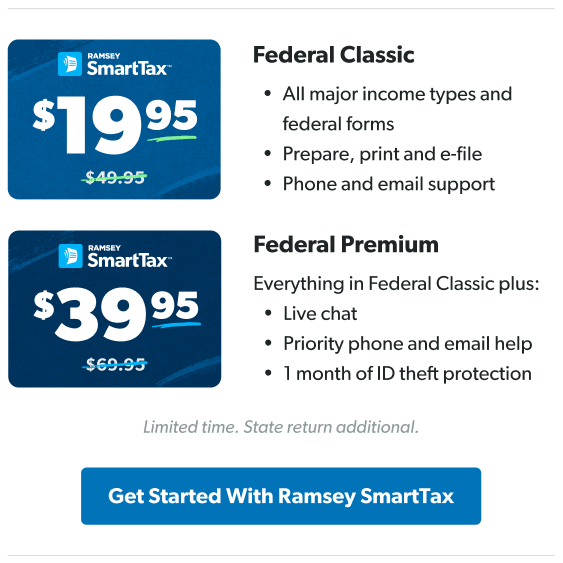
Powered by TaxSlayer, Ramsey SmartTax gives you access to all major federal tax forms, deductions and credits at a clear, up-front price. There are no surprise fees and no charges just because your tax situation is more complicated. It offers two versions: Federal Classic and Federal Premium.
Federal Classic includes everything most people need to prepare, print and e-file a federal tax return with the IRS—at a lower, straightforward price. For $20 more, Federal Premium adds extra support and peace of mind, including priority technical help and additional protections.
And if you’re looking for ways to be more intentional with your finances, Ramsey SmartTax also offers a Federal Premium + EveryDollar version, which gives you access to EveryDollar for one year. EveryDollar is Ramsey’s easy-to-use budgeting app. It’s helped millions of people take control of their money by helping them create a monthly zero-based budget.
If you also need to file a state return, Ramsey SmartTax makes that simple too. The cost to file a state return is $49.95, whether you choose Federal Classic or Federal Premium.16 And if you start with Federal Classic and later decide you want extra support, you can upgrade to Federal Premium at any point during the process.
One of the biggest advantages of Ramsey SmartTax is what it doesn’t do. Your data isn’t used to sell you credit cards, and no attempts will be made to sell you an advance loan on your refund. There are no hidden fees and no forced upgrades—just clear pricing and a debt-free approach to filing your taxes.
Here’s a recap on Ramsey SmartTax’s two versions:
|
Filing Option |
Features |
Cost to File Federal Return |
Cost to File for Each State Return |
|
Federal Classic |
|
$49.95 |
$49.95 |
|
Federal Premium |
|
$69.95 |
$49.95 |
|
Federal Premium + EveryDollar |
|
$149.95 |
$49.9517 |
Check Out Ramsey SmartTax Today
Bottom line: We want you to win with money 24/7—and that includes tax time. That’s the main difference between Ramsey SmartTax and other tax software. Ramsey SmartTax is designed to keep you winning. When you e-file with Ramsey SmartTax, you know you’re getting a clear and affordable price, a reliable filing partner, and most importantly, a product that keeps your well-being and financial future in mind.
Don't just file your taxes this year—file them the right way.
Next Steps
- Review your personal tax situation—whether simple or complex—to decide which software features you truly need.
- Compare the total cost (including state filing) and support options across platforms before selecting your tax software.
- If you want transparent pricing and a debt-free approach to filing, check out Ramsey SmartTax this tax season.
-
What is tax software and how does it work?
-
Tax software is a tax preparation process that is designed to be more efficient and user-friendly than the old-school method of filing paper tax forms and sending them off to the IRS via snail-mail.
If you’ve ever had the pleasure (insert eyeroll here) of spreading a pile of tax forms across your desk and going back and forth, trying to fill out one form while pulling numbers from two more, and keeping track of instructions on yet another form, you know how frustrating and time-consuming it is. Not to mention sending all those forms, including your personal information, to the IRS in the mail. No thanks!
Tax software streamlines that process by asking you a series of questions about your tax situation, then using the answers you provide to walk you through the tax preparation process one step at a time. You’ll still have to refer to your tax forms and plug in some numbers, but the instructions will be much easier to understand and follow, plus you won’t have to worry about whether your own calculations are correct.
The last step of using tax software is the actual electronic filing (or e-filing) of your taxes. It’s a quick and secure way of filing, and you’ll know before you e-file whether you owe money to Uncle Sam or if you’ll be getting a refund.
And here are a few more perks of using tax software over the old-school method of self-filing:
- Secure, long-term storage: A lot of online tax software will store your tax return information in the cloud year after year so you can access it when needed. This saves a lot of time when you start filing next year’s return! And you’ll create a password-protected account to log in every time you need to access your information or work on a return, so tax software is a secure way to file.
- State returns: All tax software focuses on making filing your federal taxes easier, but the most popular software also lets you file your state taxes (for an extra fee, in most cases).
- Accuracy and diagnostics: One of our favorite things about tax software is how accurate it is. It takes the guesswork out of all those calculations and breaks down the preparation process into user-friendly bits of instructions.
- Credit and deduction suggestions: Many tax software programs will suggest tax deductions and tax credits and give you a brief rundown on how they work. But ultimately, you’ll have to decide whether you actually qualify for a credit or deduction and which ones you want to claim.
- Online and live support: Most tax software programs come with support, whether it’s a simple help function, a glossary that explains tax terms, or a version of their program that includes live one-on-one chat with a tax professional.
-
How much does it cost to file taxes with tax software?
-
The cost of filing with tax software depends on several things:
- Which software you choose
- Which version of the software you choose (Most popular tax software programs will offer three or four different versions of their software to meet different tax needs and situations, and each version will have a different price point.)
- Whether you have a state return
- Whether you need any additional support (Sometimes choosing additional support will bump you up into the next-higher-priced version of the software, and sometimes it’s just an additional fee that’s added to your current version’s price. That’s why we recommend Ramsey SmartTax—there’s some support built in with no hidden fees!)
-
Who should use tax software?
-
Tax software can handle a lot of different tax situations, but if you’re unsure about whether it’s worth your time to check it out, here’s a run-down on the times when it makes sense to use tax software to file:
- You have a relatively simple tax situation. And by simple, we mean you only have one or two sources of income, you plan on taking the standard deduction or making simple itemized deductions, you have few or no investments outside of your tax-advantaged retirement accounts—think a Roth 401(k) or IRA—and you haven’t taken money out of your retirement accounts before you’re eligible.
- You had few life changes this year. If your life this tax year looks much the same as it did last tax year, or you only had a few life changes (like buying a home, getting married, or welcoming a new baby), you can probably handle filing with tax software. If you’ve experienced more major life changes, you should get in touch with a tax pro. More on that later.
- You’re comfortable filing on your own. If you’re comfortable navigating the software and spending a few extra weekend hours to file online yourself—then tax software is probably for you! Just keep in mind that it’ll be on you to fix any filing errors that might happen in the process. Before you begin, check out our Tax Prep Checklists or our Beginner’s Guide to Taxes to get started so you can knock out your taxes and move on with your year.
-
Who shouldn't use tax software?
-
Sometimes your taxes can be a bit more complicated. You should strongly consider using a tax pro if:
1. You have a complex tax situation. If your tax situation involves a lot more tax forms or paperwork than just a W-2 and a couple of 1099s, then it might be time to call a tax pro! Here are a few situations that could complicate your tax situation and require a tax professional’s help:
- You have a lot of taxable investments outside of your retirement accounts.
- You made a big Roth conversion.
- You own a rental property.
- You owe taxes in multiple states.
In those cases, it’s worth spending a few hundred dollars to let a qualified tax expert answer your questions and file your return for you.
2. You had major life changes this year. Online tax software can handle a few specific life changes (getting married, buying a new home, and having a baby), but tax pros can help you navigate through any major life change. We recommend using a tax expert if you retired, received an inheritance or other large lump-sum, or went through some other major life event this tax year that’ll significantly change your tax situation.
3. You’re not confident about filing your taxes. Whether it’s your first time filing taxes or you’re just not familiar or comfortable with online tax software, there’s no shame in skipping the software! Tax season is stressful enough, so let a tax pro handle the heavy lifting and give you confidence that your return is being filed correctly.
4. You want to save time. We know you’re busy with work and family, and using tax software to file your taxes can take a few hours of your time. If you’ve got better things to do on your Saturday than taxes, bring all your paperwork to a tax pro and let them file for you instead!
5. You own a business. If you have to file a separate business tax return or you’re a sole business owner who reports income (or loss) from your business on your personal tax return, this makes your taxes more complex. A tax pro can file for you—and take the headache out of payroll and bookkeeping too.
You may have other reasons for considering a tax pro. Maybe you’re still wrapping your head around how inflation has affected your tax bracket and tax rate. Or maybe you could file your taxes on your own, but you just don’t want the hassle. Do what works for you! Sometimes it just makes sense to get the advice of a professional. It is their day job, after all. Reach out to a RamseyTrusted tax pro and let them take some of the stress of tax season off your shoulders.
-
When are taxes due?
-
Taxes for tax year 2025 are due on April 15, 2026. This is also the deadline for requesting an extension. If you do request an extension, the extension deadline is always six months from Tax Day: October 15, 2026.
Get Weekly Insights Delivered Straight to Your Inbox
Did you find this article helpful? Share it!

About the author
Ramsey Solutions