
How to Create Your Budget With EveryDollar
 By
Key Takeaways
- A zero-based budget means your income minus your expenses equals zero. Every dollar gets a job before the month starts.
- Budget for giving, saving and your Four Walls (food, utilities, shelter and transportation) before you spend a dollar on extras.
- If you have debt, cut back on restaurants, entertainment and other extras so you can put more money toward your debt snowball.
- Track your transactions throughout the month so you know exactly how much you have left to spend.
- Build next month’s budget before the month begins. And if you’re married, make that budget together.
The word budget can get a bad rap. People think budgets are hard, time-consuming and restricting. But listen: The budget life is so worth it.
Budgeting doesn’t tell you not to spend. It gives you permission to spend the right way—to show your money who’s in charge. (You.) And with EveryDollar, creating a monthly budget is easier than you might think.
Quick Answer
To create a monthly budget with EveryDollar, enter your take-home pay, then list your expenses—starting with giving, saving and your Four Walls (food, utilities, shelter and transportation). Keep adjusting your planned amounts until your income minus your expenses equals zero. Then track your transactions throughout the month and make adjustments as needed to stay on budget.What Is a Monthly Budget?
A monthly budget is a plan for your money. Every dollar. Every month. When you create a monthly budget, you tell your money where to go so you’re never again left wondering where it went.
Your budget starts with your income—that's any money you expect to receive during the month. Be sure to use your take-home pay (what actually lands in your bank account after taxes and payroll deductions), not your gross income.
Then you've got your expenses. And we're talking about more than just bills and groceries. You'll need to budget for giving, saving and debt payments. Every dollar needs a job!
Budget Step 1: How Do You Enter Your Income in EveryDollar?
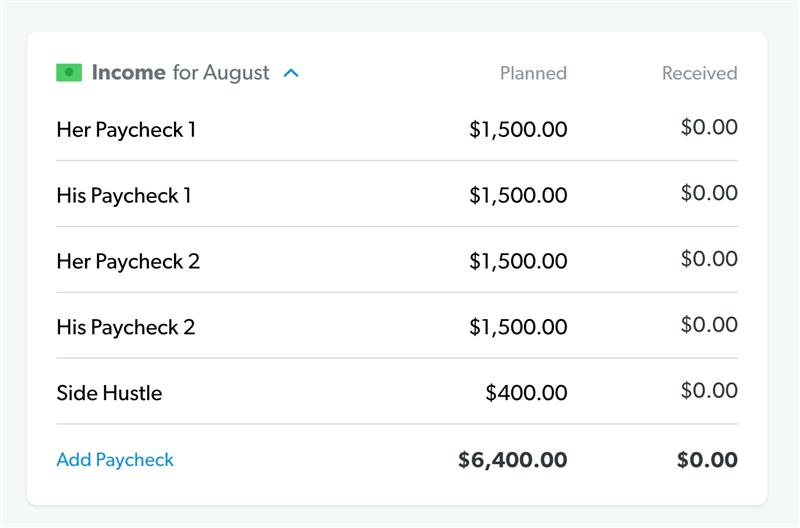
The first step to create your monthly budget is simple: Enter your income. Income is any money you plan to get during that month—that means your normal paychecks and any extra money coming your way through a side hustle, garage sale, freelance work and the like.
Here’s how you enter your income in EveryDollar:
- Click Add Income.
- Label the income as Paycheck 1, Paycheck 2, Side Hustle Money, or your employer’s name—whatever works for you!
- Click the Planned amount and add in a planned dollar amount.
- Repeat that process with all the income you (and your spouse, if you’re married) will earn in a month.
If you’re paid by the hour, look at your past paychecks.
Check your recent paystubs to see how much you typically bring home after taxes and deductions. If your hours change from week to week, use your lowest normal paycheck to help estimate your monthly income. That way, you aren't budgeting with money you might not earn.
If you’re a freelancer or your income changes, start with a three-month average.
Add up what you brought in over the last three months, then divide by three.
Say you made $3,200, $2,400 and $4,000. That's $9,600 total, and $9,600 ÷ 3 = $3,200 a month on average.
That average gives you an idea of what you normally earn. But when you're planning your budget, start with the lowest of those months ($2,400) so you don't count on money that might not come in.
Anything you earn above that is extra money you can give a job when it lands. Put it toward your current money goal! And if you're self-employed, remember to budget for taxes since they aren't automatically withheld from your paychecks.
Budget Step 2: How Do You List Your Expenses in EveryDollar?
Next, list every expense you plan to have this month in EveryDollar, starting with giving (we believe in 10% of your income here), saving (especially if you don't have an emergency fund yet), and your Four Walls. Then work your way through your other essentials and any extras.
Cover your Four Walls.
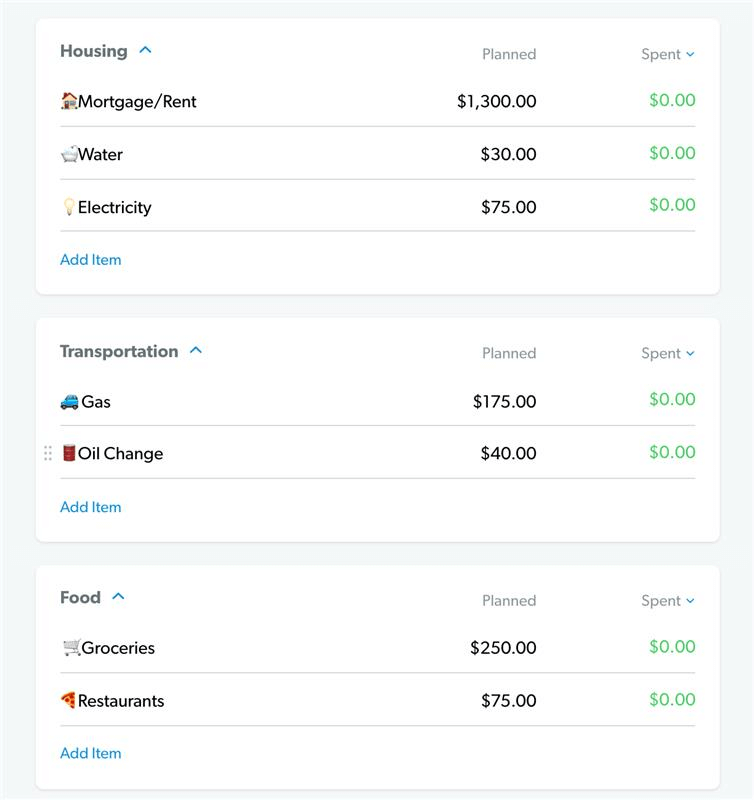
Your Four Walls are food, utilities, shelter and transportation. That means feeding your family, keeping the lights on, paying the rent or mortgage, and putting gas in the car and keeping it running.
In EveryDollar, you’ll cover your Four Walls inside the Food, Housing and Transportation budget categories. Under each category, you can add budget lines by clicking Add Item and naming the line. (You can even use emojis to customize it! Hey, who says budgeting isn’t fun?)
Some budget lines are easy to plan for because they’re what’s called a fixed expense—aka you pay the same amount every month. Your rent or mortgage, for example, is probably a fixed expense.
Other expenses change month to month, like how much you spend on gas. Don’t worry. You can log in to your online banking and look over the past couple of months to see what you usually spend on that expense. Make a good estimate based on your past spending and put that into the planned amount.
Do this for any food, utilities, shelter and transportation expenses you pay each month.
Then list all other monthly expenses in EveryDollar.
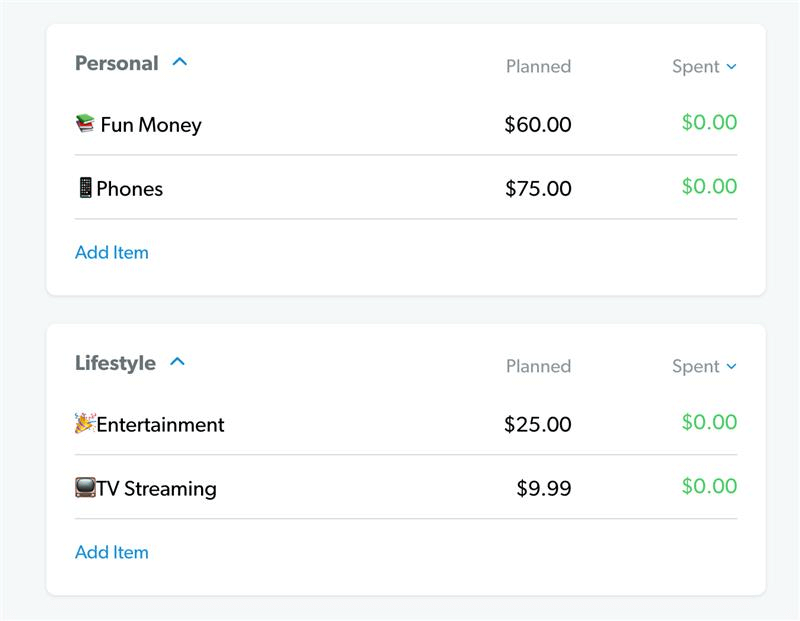
Once you've covered your Four Walls, it's time to list your other monthly expenses. Start with essentials like insurance, debt payments and childcare. Then add a miscellaneous line and budget for any entertainment and fun money (sometimes called personal spending).
In EveryDollar, you’ll see these categories: Personal, Lifestyle, Health, Insurance and Debt. Create the budget lines you need under each one, starting with fixed expenses before filling in estimated amounts for the rest.
Okay now—here’s an important callout. Very. Important. If you’ve got debt, you shouldn’t be piling money into an entertainment or restaurant budget line. You need to cut back on all the extras until you’ve kicked debt out of your life. Forever. Every dollar you cut goes toward your debt snowball—where you pay off your debts from smallest to largest, regardless of interest rate—once your $1,000 starter emergency fund is in place.
Why? Debt steals this month’s income to cover something in the past. It’s like taking two steps forward with your money only to be yanked back again. Get rid of the debt. Then you’ll free up money each month to do what you want instead of what your debts demand.
Budget Step 3: How Do You Zero Out Your Budget in EveryDollar?
To zero out your budget, subtract your total expenses from your income until you hit zero. (And guess what—EveryDollar does this for you automatically as you fill in your budget lines! Heck yeah.)
If you have money left after subtracting all your expenses, put it toward your current money goal, like saving or paying off debt. If you end up with a negative number, you need to cut some expenses.
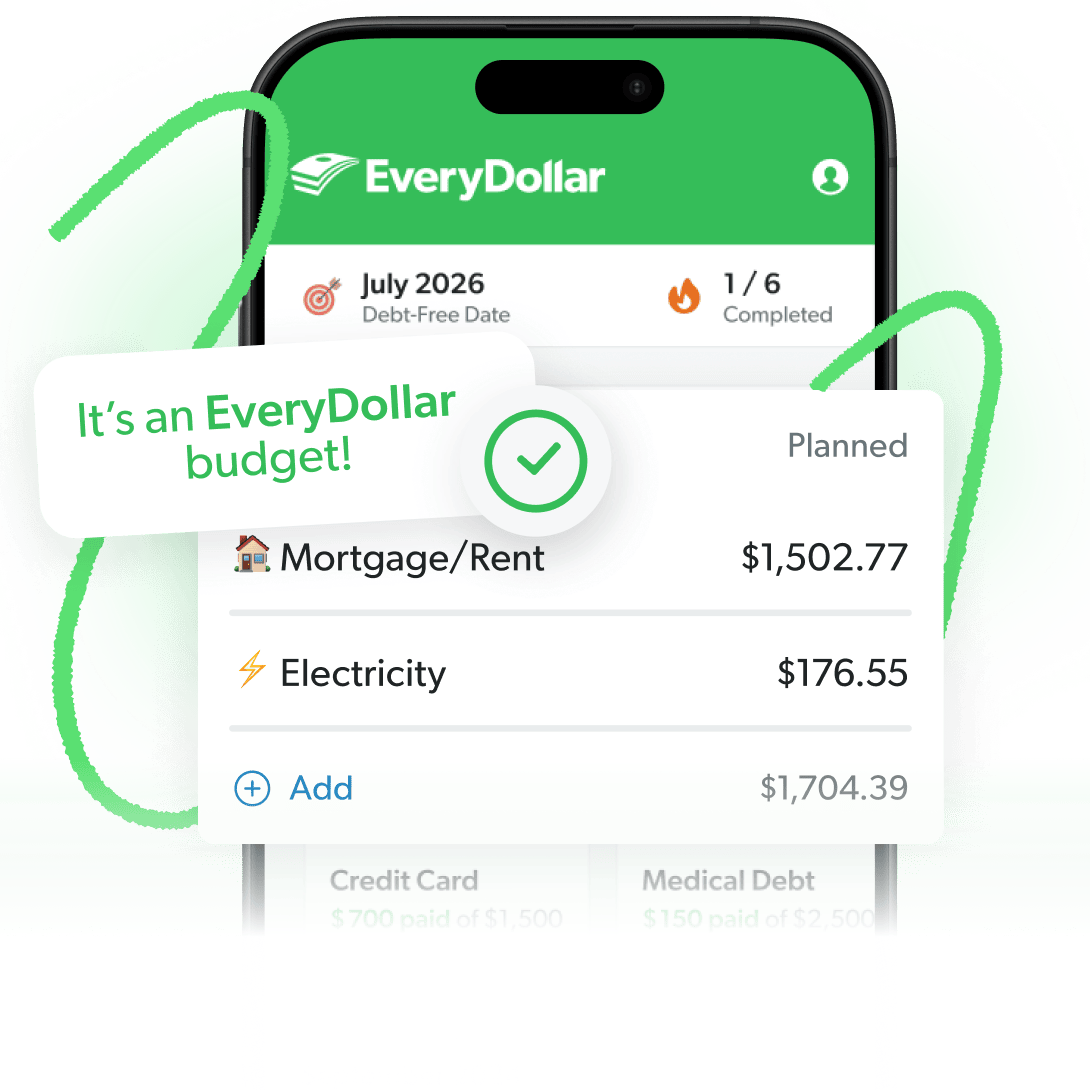
To help you know when you’ve reached zero, we announce it proudly at the top of your screen: “It’s an EveryDollar budget!” If you see that, celebrate. You just budgeted to zero.
(Now, and this is important, your bank account should never hit zero. Keep a little buffer in your checking account of about $200 for extra safety.)
Budget Step 4: How Do You Track Your Transactions in EveryDollar?
Track every paycheck, bill and purchase in EveryDollar throughout the month so you always know how much money you have left to spend.
Tracking expenses is a great way to stay accountable to yourself and your budget! If you're married, you and your spouse can track in the same shared budget. (We'll show you how later.)
And don't wait until the end of the month to do this. Tracking as you go helps you know when to adjust your budget so you don't overspend. It's one of the most important ways to take control of your money.
To manually track a transaction in EveryDollar, open your budget and tap the budget line you want to add a transaction to. Then tap the plus button, enter the transaction details, and save it. You can track as you make a purchase, once a day, once a week, or whatever rhythm keeps you from forgetting!
With EveryDollar premium, tracking is even easier. Connect your bank account to automatically stream in your transactions—then just drag and drop each one to the right budget line. Less typing, more time back in your day!
Split a transaction when one purchase covers more than one budget line.
Sometimes one shopping trip covers more than one budget line. When that happens, you can split the transaction so each part of the purchase goes where it belongs.
Say you ran into the store for tissues, breakfast bars and a mini puppy cardigan. That one receipt covers household items, groceries and pets, so you'd split it across those three lines.
If you're budgeting on your computer, here's how to split a transaction:
- Add the transaction and choose the first budget item.
- Click Add a Split to add another budget item.
- Enter the amount for each item.
- Click Add Expense.
If you're using the mobile app, follow these steps instead:
- Open the transaction and tap Budget Item(s).
- Select the budget items you want to split the transaction between.
- Enter the amount for each item, making sure they add up to the full total.
- Tap Done.
Just remember, you can only split transactions within a single month.
Budget Step 5: How Do You Create a New Budget Each Month?
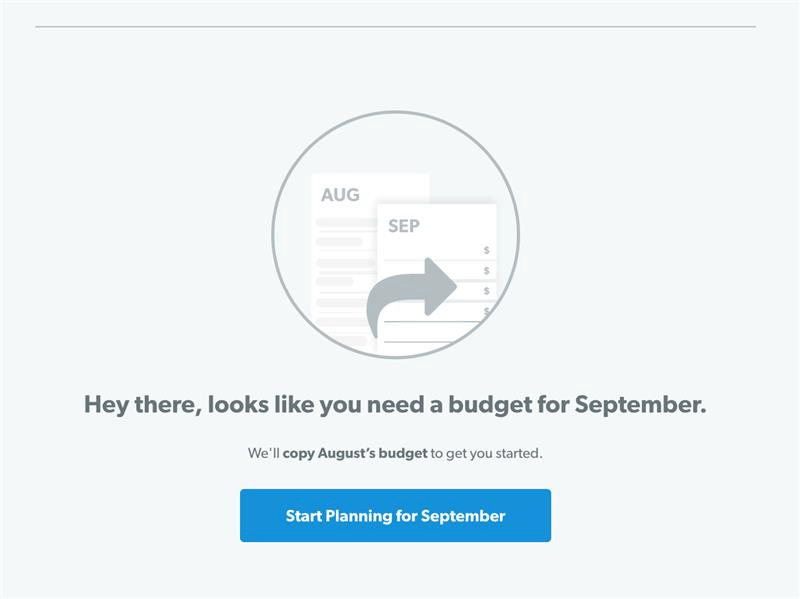
Create next month's budget before the month begins by copying your current budget and adjusting it for any upcoming expenses.
Budgeting isn’t a one-and-done situation. It’s more of a lather, rinse and repeat. Here are a few things to remember as you get ready for another month.
Review last month before you copy it.
Before you copy last month's budget, take a look at how you did. Make sure you've tracked every transaction so you have an accurate picture of where your money went.
If you have EveryDollar premium, open Insights to see your income versus spending, a breakdown of where your money went, and how your income has changed over time. It's super handy if you have an irregular income or want to see how a side hustle is adding up.
On the free version, compare the planned and spent amounts on each budget line. Either way, look for areas where you overspent so you can make a better plan for the month ahead.
Budget every month, before the month starts.
Don't wait until the first of the month to start planning. You want your budget ready to go before the new month begins.
Why? Because thinking ahead is how you get ahead in life and with money. With EveryDollar, it’s easy. You just copy the previous month over and tweak what you need to.
Plan for month-specific expenses.
After you copy your budget, think about what's coming up next month. Get out your social calendar. Is it your BFF’s birthday? You’ll need a spot in the budget for that present.
Then think about other needs coming up. Does your car need an oil change? Do the kids need seasonal clothing because the weather’s changing and they just keep growing? (Outgrowing their clothes is one thing kids do best.)
You’ll probably miss something because you can’t see the future, after all. But you can plan for what you know is coming and have a miscellaneous line for any surprises.
What if Your Budget Doesn’t Balance?
If your expenses add up to more than your income, you need to cut spending or bring in more money until your budget hits zero. Start by cutting your wants before making adjustments to your needs. That negative number is your budget showing you there's a problem before the month starts, while you still have time to fix it.
Here's where to start:
- Cut the extras first. Restaurants, takeout, entertainment, hobbies and subscriptions you don't use can all go before anything else. (And for goodness’ sake, cancel that gym membership you haven't touched since January.)
- Lower your variable expenses. You still have to eat, so don't zero out groceries. But look for ways to trim your grocery, clothing and gas budgets to what you actually need, not what you're used to spending.
- Look at the big-ticket expenses. If a car payment or your housing costs are taking too big a bite out of your income, you may need to sell the car for a cheaper one or find a less expensive place to live.
- Bring in more money. Pick up extra shifts, start a side hustle, or sell things you don't need to help cover your expenses.
Then go hunting for any money you might be overlooking. Pull up the last two or three months of bank statements and look for forgotten subscriptions you can cancel or the delivery fees and little purchases that add up. Those are dollars you could be putting toward your money goals instead.
The Budgeting App That Finds Hidden Margin
You’ve got more margin than you think. EveryDollar helps you find it in minutes so you can start making real money progress, really fast.
How Does a Zero-Based Budget Compare to the 50/30/20 Rule?
A zero-based budget gives every dollar a job, while the 50/30/20 rule divides your take-home pay into three categories: needs (50%), wants (30%), and savings and debt repayment (20%). EveryDollar uses the zero-based method because it helps you put more money toward your current financial goal instead of limiting you to a set percentage.
|
Zero-Based Budget |
50/30/20 Rule |
|
|
How it works |
Every dollar gets a job. Income minus expenses equals zero. |
Income splits into needs (50%), wants (30%) and savings (20%). |
|
Debt payoff |
Money left after your bills goes to the debt snowball in Baby Step 2. |
Minimum payments count as needs. Extra payments come out of the 20%. |
|
Savings and investing |
Save $1,000, pay off debt with the debt snowball, build a full emergency fund, then invest 15% for retirement. |
The 20% for savings and extra debt payments gets divided among competing goals, which can slow your progress. |
|
Speed |
Put as much money as possible toward your current Baby Step to reach your goal faster. (We call this gazelle intensity.) |
With just 20% set aside for savings and extra debt payments, reaching your goals could take longer. |
Remember, when you use the zero-based method, any money left over after you budget for all your expenses goes toward your current Baby Step. You aren’t stuck at only 20%. And you aren’t throwing money at three goals at once. You’re tackling your money goals one at a time and focusing all your intensity on getting them done.
How Do You Use EveryDollar With Your Spouse?
You and your spouse can use EveryDollar together with the household feature. One of you simply invites the other, and you each sign in with your own Ramsey account to see and edit the same budget. No need to share a login!
Here's how to invite your spouse:
- In EveryDollar, go to Settings and select Manage Account.
- In the Household section, select Manage Household.
- Add your spouse's first and last names, date of birth, and relationship, and select Add to Household.
- Select Yes, Invite, enter your spouse's email and select Send Invite.
- When your spouse opens the email, they’ll select Accept Invitation and sign in with their own Ramsey account (or create one).
If your spouse already built a budget of their own, don't worry. It won't be deleted. It'll just be hidden while they're in your household, and it'll come back if you remove the household link. You'll both work in the budget of the spouse who sent the invitation.
Before the month begins, sit down together and agree on the plan. Shared access only helps if you're both on the same page about where every dollar goes, so decide on giving, saving and spending before the first paycheck lands.
What Should You Remember When Making Your Monthly Budget?
As you make your monthly budget, remember to adjust your spending when life changes, save ahead for bigger expenses, and give yourself some grace while you're learning.
Listen up, if you’re the type of person who procrastinates, put off something less important—like flossing. But never put off your budget.
Adjust your monthly budget when needed.
Maybe you thought a budget was something set in stone. It isn’t.
Don’t be afraid to adjust your budget throughout the month. It’s actually a huge key to being a successful budgeter.
If your electricity bill is higher than what you planned, adjust. Then find that money somewhere else in the budget. Maybe your water bill was lower. Or maybe you have to lower your restaurant spending to make up for it. Adjust to make it work. Just make sure you aren’t overspending on the extras. Needs. Come. First.
And while you're making those adjustments, pay attention to why you're spending more than you planned. Sometimes your budget can reveal habits you need to work on. As Julie from THE Ramsey Baby Steps Community on Facebook shared:
"I’m realizing budgeting isn’t just about where you shop or whether you’re getting a good deal. Sometimes you have to recognize the habits that keep making you spend money you didn’t plan to spend."
Save for large or semiannual expenses each month.
Not every expense in your life happens on a regular, monthly routine. You should use a sinking fund to save up for these bit by bit. For example:
- If your car’s engine isn’t looking so hot, start saving for the repairs.
- If your insurance premium is due twice a year, divide the cost and save each month.
- If you’ve got a pet, save some each month for Sir Fluffyton’s annual shots and vet visit.
These are all great examples of how sinking funds help you prepare for bigger expenses without throwing your monthly budget off track.
P.S. One of the many awesome benefits of EveryDollar is the fund feature. This lets you easily get ready for these expenses and track your savings as you go—right inside the app.
Give yourself some grace as you work on your monthly budget.
Remember learning to ride a bike? We don’t either. But think about some skill you do remember learning. It kind of sucks at first, right? You aren’t good at it. But that’s okay. That’s why they call it learning and not knowing.
Just like learning any new skill, budgeting requires a little bit of practice and patience to get right. And we know you can do it! For most users, it takes about three months to go from clumsy to comfortable. But just like the bike, eventually you’ll be so good at it you’ll forget all about the bumpy learning experience and move forward in confidence.
Here's a Tip
Give yourself three months to get the hang of budgeting. Don't quit after month one!
Budgeting takes practice, but the more you do it, the easier it gets. Stick with it, and before you know it, you'll be budgeting like a pro. Ready to get started?
Next Steps
- Download EveryDollar and create your free account. Start budgeting in the app or on your computer.
- Enter your income and expenses. Start with giving, saving and your Four Walls. Then adjust your amounts until your budget hits zero.
- Track your spending. Record transactions throughout the month, and make next month's budget before the month begins.
Get Weekly Insights Delivered Straight to Your Inbox
Did you find this article helpful? Share it!

About the author
Ramsey Solutions

Get proven Ramsey answers fast.