
Meet EveryDollar: Your Free Zero-Based Budgeting App
 By
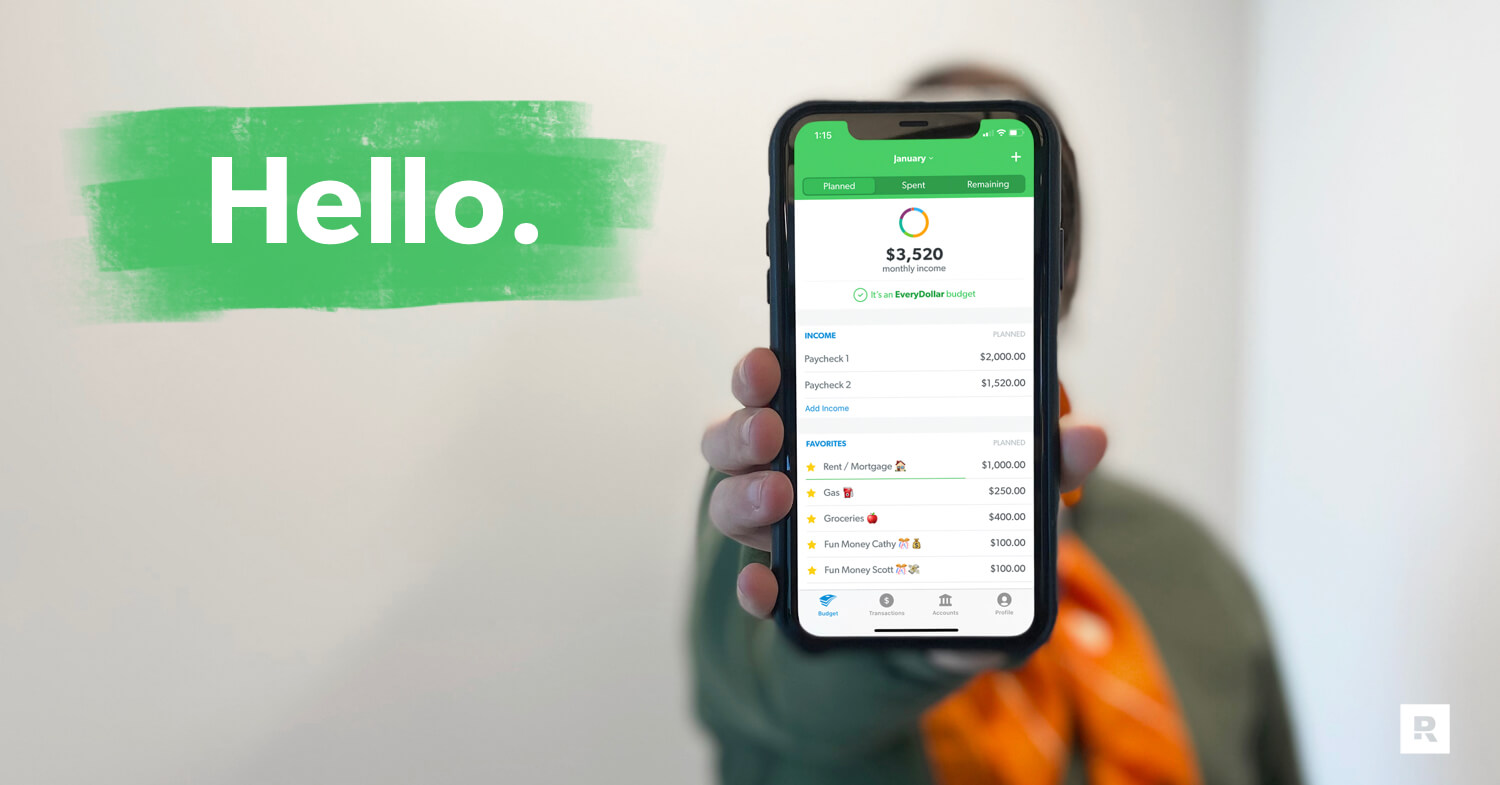
Key Takeaways
- EveryDollar is a zero-based budget app where you give every dollar a job before the month begins and take control of where your money goes.
- Start for free with unlimited budget categories and sinking funds. Premium adds extra features like automatic transaction streaming for $79.99 per year.
- EveryDollar lets you organize bills by due date, save for big purchases, and share one budget with your spouse.
- EveryDollar was built around the Baby Steps, our proven plan for getting out of debt and building wealth.
- Common beginner mistakes include forgetting irregular expenses, using vague budget line names, forgetting to track small purchases, and failing to adjust your budget throughout the month.
We can’t hide it. We love budgeting. Making a plan for your money (everything coming in and going out) is how you give your money purpose. It’s how you tell your money where to go so you’re not left wondering where it went. You. Take. Control.
This is so empowering!
But with so many ways to budget out there, how do you pick a method you’ll actually use? Insert EveryDollar.
Quick Answer
EveryDollar is the zero-based budget app built by Ramsey to help you focus your money and reach your financial goals. You take control of your money by giving every dollar a job before the month begins. Start with the free version or upgrade to premium to connect your bank and automatically stream transactions into your budget.What’s so great about EveryDollar? Glad you asked.
What Is the EveryDollar Budgeting App?
EveryDollar is the zero-based budgeting app built by Ramsey Solutions to help you give every dollar a job.
Over 30 years ago, personal finance expert and nine-time national bestselling author Dave Ramsey started giving financial advice on the radio. And today, The Ramsey Show has millions of weekly listeners.
But Ramsey Solutions also wanted to help people live out the show’s biggest piece of advice: Make a zero-based budget and live by it—every single month. That’s why we launched EveryDollar in 2015, with both free and premium versions. And today, EveryDollar has a community of over 10 million budgeters!
What Features Does EveryDollar Offer?
EveryDollar offers a completely free version of the app with features to help you create a budget, track your spending, and save for future expenses. And if you want to upgrade, the premium version is $79.99 per year and comes with even more features to help you manage your money.
Here’s a breakdown of some of the features in each version:
Free Budget Features
- Create monthly budgets
- Access your budget on your computer, phone or tablet
- Manually track transactions
- Customize budget categories and line items for all your monthly expenses
- Create unlimited budget categories and line items
- Set and track your financial goals
- Set up and track sinking funds
- Split transactions between items
- Set due dates for bills
- Talk to a live human being for customer support
Premium Budget Features
Includes all the free features, plus:
- Connect to multiple financial accounts in one app
- Automatically stream your transactions into your budget
- Plan your spending around when you get paid and when things are due with paycheck planning
- Get one-click tracking recommendations for your transactions
- Set due date reminders for your bills
- See custom budget reports on income and spending
- Export budget data (CSV file)
- Join live coaching sessions with professional financial coaches
- Calculate your current and projected net worth
- Set big-picture goals and see a timeline of when you’ll hit them with financial roadmap
How Does EveryDollar Compare to Other Budgeting Apps?
EveryDollar stands out from other budgeting apps because it offers a free version built around zero-based budgeting and Ramsey’s Baby Steps.
Check out this quick comparison chart to get a better idea of how EveryDollar stacks up.
|
Simplifi |
YNAB |
Monarch |
EveryDollar |
|
|
Free version option |
❌ |
❌ |
❌ |
✔️ |
|
Cost of paid version |
$83.88/year1 |
$109/year2 |
Core: $99.99/year Plus: $199.99/year3 |
Premium: $79.99/year4 |
|
Live coaching sessions |
❌ |
✔️ |
❌ |
✔️ |
|
Unlimited budget categories |
✔️ |
✔️ |
✔️ |
✔️ |
|
Secure bank connection |
✔️ |
✔️ |
✔️ |
✔️ |
|
Transactions automatically stream into your budget |
✔️ |
✔️ |
✔️ |
✔️ |
|
Goal setting and tracking |
✔️ |
✔️ |
✔️ |
✔️ |
|
Live customer support |
✔️ |
✔️ |
❌ |
✔️ |
|
Budget reports on spending and saving |
✔️ |
✔️ |
✔️ |
✔️ |
|
Zero-based budget focus |
❌ |
✔️ |
❌ |
✔️ |
So, YNAB and EveryDollar are the only two apps in this chart that focus on zero-based budgeting. But EveryDollar was built around the Baby Steps, so your budget works toward helping you get out of debt and build wealth from day one.
Plus, EveryDollar has a lower annual cost and offers a free version. Cha-ching times three.
What Can You Do With EveryDollar?
With EveryDollar, you can build a zero-based budget, track every expense, set bill due dates, save for big purchases, and budget right alongside your spouse.
Yes, we created EveryDollar. And yes, it’s our favorite. (You’d probably be worried if it wasn’t.) And with all those features, can you blame us? But that’s just the beginning. Let’s take a closer look at what you can do with EveryDollar.
1. Create zero-based budgets.
Zero-based budgeting means your income minus your expenses equals zero. Every dollar gets a job, whether that’s giving, saving or spending.
With EveryDollar, you can create your first monthly budget in three quick steps:
- Enter all your income: Remember, this includes your regular paychecks, side hustles—everything coming in.
- Enter your expenses: Plan for all the giving, saving, spending—everything going out.
- Subtract your expenses from your income: This should equal zero (aka zero-based budgeting), which means you give every single dollar a job!
Here’s what that could look like with a $3,000 monthly income:
- Giving: $300
- Saving: $300
- Housing and utilities: $1,300
- Food: $450
- Transportation: $400
- Everything else: $250
$3,000 income − $3,000 expenses = $0. Every dollar has a job.
You’ll know you’ve budgeted to zero when you see a big green check mark and the words “It’s an EveryDollar budget!” at the top of your screen. (Maybe one day we’ll have the technology to shoot live confetti out of your phone to celebrate. Until then, your vacuum is probably thankful.)
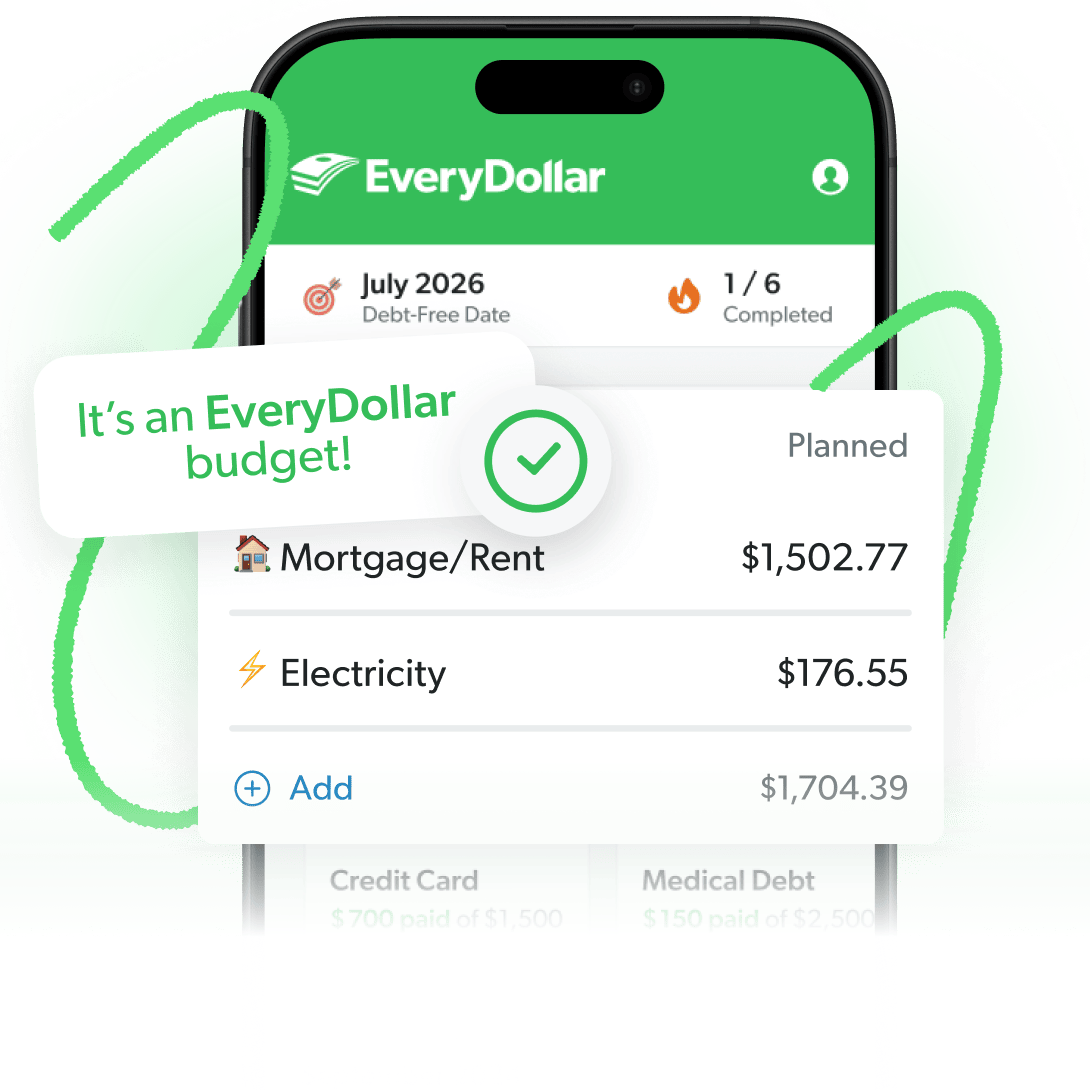
The Budgeting App That Finds Hidden Margin
You’ve got more margin than you think. EveryDollar helps you find it in minutes so you can start making real money progress, really fast.
2. Customize your budget.
Customize your budget by naming your budget categories and lines whatever you want—and make as many as you want. This is your budget, and it should reflect your spending.
You can also add emojis for some visual flare. Who said budgets have to look boring? (No, really, who said that? We want to tell them about this feature.)
3. Track your spending.
With EveryDollar, you can track every expense as you go so you always know how much money you have left to spend.
Just add each expense to the correct budget line anytime, anywhere. Enter it in your car before you ever leave the store parking lot. Or on your couch right after you pay that bill online. That way, you see what’s left to spend—and you don’t overspend.
And if you want to make it even easier, upgrade to the premium version of EveryDollar so you can connect your budget to your bank. Then those transactions will stream in automatically. You just drag and drop each one to the right budget line.
Nathan, a member of THE Ramsey Baby Steps Community, shared why EveryDollar premium is worth it for him:
“It basically does all the work for me from my bank. All I gotta do is go over it quickly weekly with my wife and once on the 1st [of the month] to set up. 20 minutes, easy peasy.”
But whether you track by hand or let premium do it, never skip it. Budgeting is how you plan. Tracking is how you keep up with the plan and close out each month strong.
4. Add due dates to bills.
Keep track of when your bills are due by adding due dates right to your EveryDollar budget. Just tap on an expense and add a due date in seconds.
The visual reminder will show up under that budget line every time you open EveryDollar, helping you remember when to pay—or when that auto draft comes out.
5. Create funds to meet savings goals.
Create sinking funds in EveryDollar to save up for expenses that only come around once or twice a year (like car insurance or Sir Barksalot’s yearly checkup) and big purchases (like a new set of tires, a TV or a trip to the beach).
You can set up funds in a snap and keep track of your progress.
6. Use on multiple devices (and share with your spouse).
Yep, you can access your EveryDollar budget on your phone, tablet or desktop (or all three). But it gets even better. If you’re married, you can both sign in to the same account so you can budget together, even when you’re apart. Talk about accountability!
7. Plan your budget around your paychecks.
Paycheck planning helps you plan your spending around when you get paid and when your bills are due. If you have an irregular income—or you get paid more than once a month—you can use this feature to make sure your money lasts between paychecks.
That way, you don’t have to worry about running out of money before your next paycheck or getting hit with overdraft fees. The confidence it brings makes it one of our favorite reasons to upgrade.
8. Crush Dave’s Baby Steps even faster.
EveryDollar was created with the Baby Steps in mind (aka the proven plan for saving money, paying off debt and building lasting wealth).
And listen, whether you’re on Baby Step 1 or 7, you need to budget. Budgeting is how you tell your money where to go. That means if you want your money to go toward ditching that debt, building your emergency fund, investing, saving up for a house . . . all those things—you budget for it!
So, budget with EveryDollar to crush the Baby Steps faster.
9. Show your money who’s in charge. (You.)
EveryDollar helps you find extra margin every month so you can start making real money progress really fast. And no matter where you’re at with money, you can get better. That’s why we made the EveryDollar budgeting app!
Just download the app, answer a few questions, and we’ll build you a personalized plan based on your situation to help you free up margin and make the most of every dollar. Every day.
What Are the Most Common EveryDollar Beginner Mistakes?
Some common beginner budgeting mistakes include forgetting irregular expenses, using vague budget line names, forgetting to track small purchases, and never adjusting your budget mid-month. The good news? EveryDollar has features to help you avoid these mistakes as you get the hang of budgeting.
Here are four mistakes to watch out for in your first few months.
Forgetting Irregular Expenses
Forgetting to budget for irregular expenses can throw your whole month off track. Car registration, holiday gifts and the vet bill don’t show up every month, which is why they can wreck your budget when they do.
Create a sinking fund in EveryDollar for each one and divide the total cost by the number of months until it’s due. That way, you’re setting aside money a little at a time instead of scrambling to cover the full amount at once.
Using Vague Category Names
A line called “Other” or “Stuff” doesn’t tell you much, does it? Instead, name each line after the real thing, like “Dog Food” or “Date Night,” so you know exactly what the $40 left in that line is for.
Forgetting to Track the Small Purchases
Even the smallest purchases need to be tracked in your EveryDollar budget. That $6 coffee and the $12 you handed the babysitter came out of your budget too.
Track every expense, even the small ones, so you know exactly how much money you have left to spend in each budget line.
Never Adjusting Your Budget Mid-Month
Your budget should change when your plans or expenses change throughout the month. A budget isn’t a slow cooker. You can’t set it once and walk away.
If the car needs new tires or the electric bill comes in higher than you planned, move money between budget lines to cover the difference. Just make sure you’re still budgeting every dollar.
Here's a Tip
It takes about three months to feel like you know what you’re doing with a budget. Don’t quit after month one.
You don’t have to be a budgeting pro to get started with EveryDollar. Give yourself room to learn as you go, and don’t get discouraged if your first few budgets aren’t perfect. The more you budget, the easier it gets. And every month is another chance to make progress with your money.
Next Steps
- Download EveryDollar and create your free account. Answer a few questions to get started with your personalized budget.
- Create your zero-based budget. Enter all your income for the month, then make budget lines for giving, saving and spending until your income minus your expenses equals zero.
- Track every expense. Keep up with your spending throughout the month, even those small cash purchases. And don't forget to adjust your budget as needed!
Frequently Asked Questions
-
What is zero-based budgeting?
-
Zero-based budgeting is a method where your total income minus your total expenses equals exactly zero. That means every dollar gets a specific job (giving, saving or spending) before the month begins. And don't worry, that doesn't mean you spend every dollar! You're simply telling your money where to go instead of wondering where it went.
-
Is EveryDollar hard to maintain?
-
Nope! Once you get past the first three months of learning how to budget, most people can keep up with their budget in about 15 minutes a week. Our premium version makes it even easier by automatically streaming your transactions into the app so you can just drag and drop each one to the right budget line.
-
Who is EveryDollar best for?
-
EveryDollar is great for anyone who wants to take control of their money, whether you're working to get out of debt or build wealth. And because it's built around the Baby Steps, you can use it to make progress toward your financial goals no matter what Baby Step you're on.
-
Is EveryDollar really free?
-
Yes! EveryDollar has a completely free version that lets you create monthly budgets, set up unlimited categories and sinking funds, manually track transactions, and add due dates to bills. And if you want even more features, you can upgrade to our premium version for $79.99 per year to get automatic transaction streaming, paycheck planning and more.
Get Weekly Insights Delivered Straight to Your Inbox
Did you find this article helpful? Share it!

About the author
Ramsey Solutions

Get proven Ramsey answers fast.