
What Is a VPN (and Do I Need One)?
 By
By 
Key Takeaways
- A virtual private network (VPN) protects your internet connection no matter where you are—at a coffee shop, in another country, or even at home.
- VPNs put a shield around your connection so any personal data you send over the internet can’t be seen and intercepted.
- Internet service providers usually track your activity, but VPNs prevent that.
- Make sure you get a reputable VPN that uses strong protocols and doesn’t log your activity.
- A VPN is just one important part of a full identity theft protection plan.
If you’re a slightly tech-savvy TV addict, you may be familiar with virtual private networks (VPNs) as a way to skirt country restrictions—so you could watch the new season of Sherlock before it dropped in the U.S. But in a cybersecurity context, they’re recognized as a key part of protecting your data online.
So, what is a VPN, and how does it keep your information safer?
VPNs hide your location and internet activity so bad guys looking for sensitive data traveling between servers can’t see it or intercept it.
Keep in mind, VPNs don’t provide full identity theft protection—but they should be part of any plan you consider. Let’s see why.
What Is a VPN? (And Why They’re Important)
A VPN is a layer of protection that shields your internet traffic, making it harder for outsiders to steal your data. As the name suggests, it makes your internet connections (and so your internet activity) private—it’s often described as a secure tunnel through the internet.
Most people use a VPN through an app. You buy a subscription, download it to your phone or computer, and it protects your connection no matter where you go or what network you’re on.
VPNs are important because cybercriminals everywhere are scouring internet connections looking for unprotected sensitive data. A VPN’s core purpose is privacy—which equals security, because snoopers can’t see your activity and so won’t know to target your data while it’s traveling on your internet connection.

What's your risk of identity theft?
Take this quiz to assess your risk.
What Does a VPN Do?
In case that definition felt a little too technical, here’s what a VPN does for you practically:
Protects Your Information on Public Wi-Fi
Do you drink coffee? In coffee shops? Do you get on the Wi-Fi while you’re there? What about at airports? Or hotels? Your connection isn’t private in any of those places, which means your info is vulnerable.
A VPN prevents man-in-the-middle attacks where hackers intercept your communication with a website and pretend to be the website until you give them your info.
Some scammers even set up fake Wi-Fi hot spots to look like Starbuck’s Wi-Fi (for example), but it’s really just traps to intercept your data. Yikes. But even if you accidentally connected to one, your data would still be hidden—if you used a VPN.
Encrypts Your Internet Traffic
Don’t you just love it when you research leak-proof underwear for your elderly mom and then suddenly every website is hawking it—even during that big meeting at work? That happens because your ISP (internet service provider) can see where you go online and sells that info to advertisers. A VPN encrypts your internet traffic and routes it through its own servers, which keeps your activity hidden from your ISP—and keeps you from having to deal with those ads.
Hides Your IP Address and Location
Fraudsters can figure out your physical location from your IP address (more on these later), which means they can target you with location-specific scams, making them seem more legit. They can also use your IP address to impersonate you and commit cybercrimes under your name or flood your network with malware.
Helps Bypass Restrictions
A VPN can also help you get around country-specific restrictions so you can access content from all over the world no matter where you are. So, if you travel to London for business and want to kick back in your hotel room and watch a Netflix series that’s only available in the U.S., a VPN lets you do that. Whether your conscience lets you do that though is up to you.
How Does a VPN Work?
Not going to lie—this stuff can get intensely techy and start sounding like some language a sci-fi author invented. But to understand how it works, it helps to know the basics of how your internet activity travels. (Or you could skip all that and just get a VPN.)
Every device connected to the internet (MacBook, Android phone, iPad, etc.) has an IP address (a unique ID). It tells servers where your device is located in the world. When you use your device to connect to websites, your data travels to different servers, which store details about your device (like your IP address) and activity.
You could think about this process like a mail system. You’re sending and receiving packages of info to and from the servers. Your packages are marked with your IP address. At any point along those “mail routes,” your packages are vulnerable and can be intercepted by spies. They won’t take your package, but they will look inside and take the info to use against you (info like your debit or credit card number, banking info, SSN, etc.).
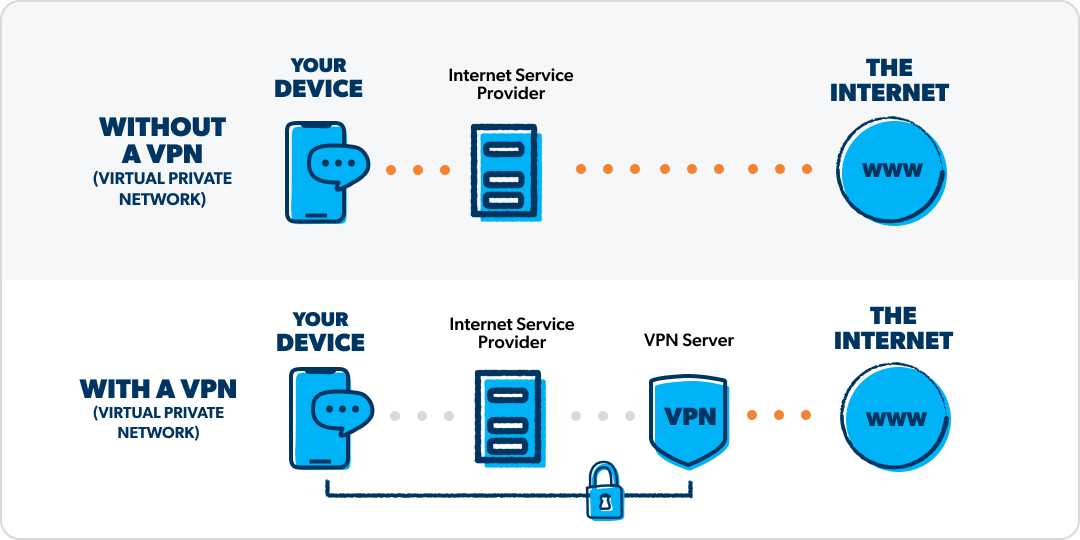
This is where a VPN comes in. It puts a shield around these “mail routes” so your packages can’t be opened or viewed. Or if you’re nerdy, think of it like a cloaking device. The VPN hides the routes using encryption, which scrambles your data so no one in between you and the server can read it. It’s like a top-secret letter written in code.
A VPN also gives you more privacy by sending your info to its servers first. That way, your info appears to outsiders to be coming from random VPN servers instead of one near your real location that could identify you. And since reputable VPNs don’t log your activity (unlike regular servers), that adds another layer of privacy.
How a VPN Works Step by Step
Step 1: Your device connects to the VPN server.
Step 2: Encryption from the VPN wraps your data to protect it from snoopers.
Step 3: Your IP address is replaced by the VPN’s server location.
Step 4: Your browsing becomes harder to track.
Types of VPNs
If you’re shopping for a VPN, it helps to know there are a few different types. For most people who just want to secure their own device, a personal VPN is the best fit.
Personal VPN
- Offers personal privacy and security
- Masks IP address, bypass geographical restrictions, and encrypt personal web activity
Remote-Access Business VPN
- Allows access to private servers remotely
- Helps workers connect to their company’s servers when they’re away from the office
Site-to-Site/Company VPN
- Connects multiple servers with a secure tunnel
- Allows a company with multiple work sites to connect them in one private network.
Do I Need a VPN?
Let’s get to the point of why we’re really here: Should you subscribe to a VPN service?
Yes, if
- You ever use public Wi-Fi
- You want to limit online tracking
- You’re worried about data brokers
- You travel frequently
- Your ISP collects and sells usage data
Here's a Tip
A VPN helps protect data in transit, but it does not stop identity theft, data breaches or financial fraud.
How to Choose a VPN
So, you know you need a VPN, but how do you pick one? There are a lot of VPN providers out there, and not all are created equal. Some shady ones track and sell your data or offer weak encryption in exchange for a low price. Let’s dig into what a good VPN looks like. Then we’ll cover the warning signs to watch for.
What Should a Good VPN Do?
A good VPN should have:
- Strong encryption standards
- A no-logs policy (doesn’t store your online activity)
- A kill switch (automatically turns off internet traffic if it detects that you’ve lost secure connection)
- DNS (Domain Name System) leak protection. (Keeps your DNS requests private by rerouting the request through the VPN tunnel so no other server logs it, including your own)
- Secure protocols that prevent your internet traffic from showing up or leaving traces (look for protocols like WireGuard, OpenVPN and IKEv2)
- Multifactor authentication for account security (Before you can access the vault, you must verify your identity on a separate device)
What to Watch Out For
VPNs are supposed to offer extra security, but some are as sketchy as the scammers you’re trying to protect yourself from. When you’re looking at VPN providers, you should avoid:
- Free VPNs (you get what you pay for)
- Shady logging policies (claims they don’t track your activity are vague or non-existent)
- Ad-supported VPNs (these often track and sell user data, use shoddy encryption, and even give you malicious ads!)
Interested in learning more about identity theft?
Sign up to receive helpful guidance and tools.
What a VPN Can’t Do
A VPN protects your internet connection—which is great and necessary.
But here’s what you can’t expect a VPN to protect you from. A VPN:
- Can’t prevent data breaches at companies
- Can’t replace antivirus or device security basics (it doesn’t protect from viruses or other malware)
- Can’t stop phishing
- Doesn’t make you anonymous
In other words, a VPN doesn’t cover all the ways your data and identity can be exposed. So you can’t just slap a VPN on your device and think you’re good to go and everything is secure. VPNs are a key part of securing your data, but they’re not a complete plan.
Why You Still Need Full Identity Theft Protection
A VPN is not full protection against all cybercrime or types of identity theft because, as we just saw, identity theft also happens in ways VPNs can’t stop, like:
- Data breaches
- Stolen Social Security numbers
- Fraudulent credit applications
- Scams and phishing
A VPN secures your online traffic, while identity theft protection monitors your personal data and responds if it’s stolen.
Let’s say a hacker pulls your email password from a data breach, gets your debit card info, and racks up $4,500 in charges before you wake up in the morning. A VPN wouldn’t help with any of that. Sad, we know.
But identity theft (IDT) protection would. A good IDT protection plan would pay out for your $4,500 loss and help you cancel your card and secure your email. It would also limit the fallout from that breached email by monitoring the dark web for signs that your sensitive data is being shared or sold.
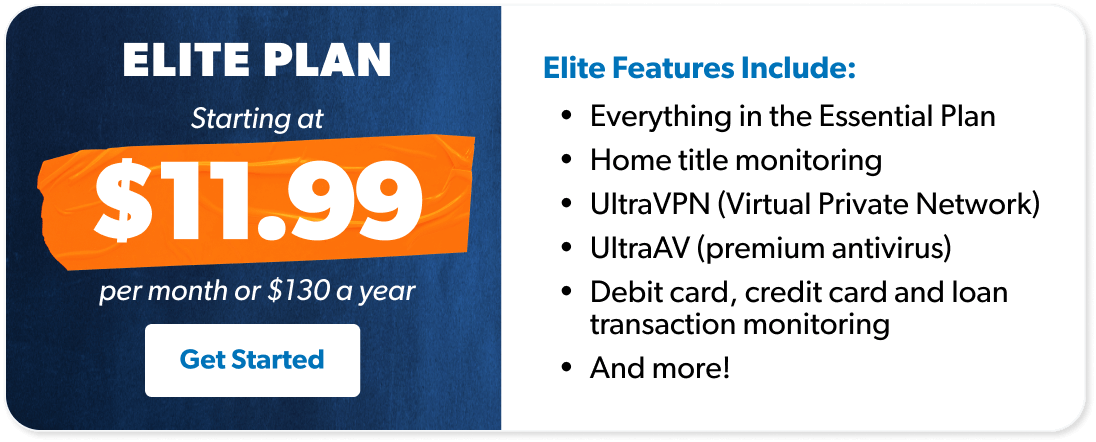
The good news is, you don’t have to pay for a VPN and identity theft protection separately. Zander’s IDT Elite plan comes with a full list of protections, including:
- UltraVPN (uses Hydra, IKEv2 and WireGuard protocols)
- Premium antivirus
- Home title monitoring
- Up to $2 million for stolen funds and expenses
- Personal and financial monitoring
- 24/7 customer and recovery services
With an Elite plan, you’re covered in all the ways a VPN can shield you and all the ways it can’t—so you can do what you need to do and still sleep at night.
Next Steps
- Learn about how vulnerable you are to data breaches and why that matters.
- Read more about how to protect your identity.
- Buy an identity theft protection plan.
-
Do I need a VPN at home?
-
Yes, you’re still vulnerable when connected at home. Internet service providers usually track and sell data—that means they’re tracking where you go online even when you’re connected in your living room. Also, unless you’re going to a secure website (look for https or a padlock icon), bad actors can intercept your data.
-
Is a VPN enough to protect me from hackers?
-
No, VPNs only protect your connection on the internet to other websites. Hackers can still hack into secure websites and steal data. That’s why it’s important to have a service that monitors whether your sensitive data is popping up in places it shouldn’t.
-
Are VPNs legal?
-
VPNs are legal in most countries, including the U.S. But there are a few countries (like Belarus, Iraq and North Korea) where VPNs aren’t legal. Other countries (like China, Russia and the United Arab Emirates) heavily restrict their use.
-
What’s the difference between a VPN and identity theft protection?
-
A VPN is just a small but important part of a complete identity theft (IDT) protection plan. IDT protection involves other forms of security like dark web monitoring, antivirus and payouts for stolen funds.
-
Is a free VPN safe?
-
A free VPN is not safe. Because you’re allowing a third party to protect your data, you’re also allowing them access to it. You need a legitimate, trustworthy VPN provider so you can be sure they’re not tracking your data and making money off you. Ever heard the saying “If it’s free, you’re the product”? In this case, it’s probably true.
Get Weekly Insights Delivered Straight to Your Inbox
Did you find this article helpful? Share it!

About the author
Ramsey Solutions

Get proven Ramsey answers fast.