
Budget Calendar: How to Plan Bills, Paydays and Due Dates
 By
Key Takeaways
- A budget calendar shows exactly when income arrives and when bills, savings transfers, and debt payments are due so timing gaps don’t turn into overdrafts or late fees.
- Before assigning any bill to a specific payday, make a list that includes every paycheck, fixed bill, variable bill and irregular expense.
- Sinking funds turn irregular and annual expenses into small, predictable monthly line items on the calendar and in the budget.
- When you match bill due dates to paydays (and calling creditors to shift due dates when needed), it prevents any single paycheck from getting overloaded.
It’s true . . . a budget is the foundation to financial peace. It’s telling your money where to go each month instead of wondering where it went.
But why does it still feel like your money is gone before the month is half over? Maybe your electric bill comes out Friday and Netflix gets paid two days after that and there’s no money to cover it.
Don’t panic . . . Your budget is doing what it’s supposed to do: plan and track how much you’re spending. You just need help tracking when you’re spending. And that’s where a budget calendar comes in.
Quick Answer
A budget calendar shows exactly when paychecks hit and bills are due each month—so you can spot cash-flow gaps before they cause overdrafts or late fees.So, let’s put your next budget month on the calendar (literally) and get a plan in place so you can spend your paychecks with confidence.
What Is a Budget Calendar?
A budget calendar is a month-by-month view of when money regularly comes in and goes out of your bank account. It shows every payday, every consistent bill due date, and every savings transfer in the order they’ll happen. Some people also call it a bill planner.

No matter what it’s called, a budget calendar can help you spot a bill that’s due before your next paycheck—and help you set payments up around the dates your money arrives. No more hoping the timing works out.
For a budget calendar to work, you first have to create a zero-based budget. That's where your income minus your expenses equals zero. Every dollar is assigned a job (whether that's a bill, savings or giving) before the month begins.
Once your budget and budget calendar are set, here's how it'll change your money habits:
- You can see a tight week coming and move a due date or an autopay.
- You stop paying late fees on bills you had the money for.
- You know which paycheck covers which bill, so autopay never pulls from an empty account.
- You stop checking your balance every two hours, saving yourself some stress.
How Do You Build a Budget Calendar?
Compared to making the budget itself, building the budget calendar is a breeze. It’s just a matter of writing down the dates when your paychecks and regular bills hit and adjusting to make sure you have enough money to cover them and your other expenses. Just follow these steps to get everything plotted out.
Step 1: List your income.
Just like how your income is the engine for your budget, it’s also the foundation for your budget calendar. Start with the paychecks you can count on. Write down each paycheck and take-home amount on the date you expect the money to land (use the deposit date, not the date on the pay stub). Keep in mind that weekends and bank holidays can shift it month to month.
Income includes:
- Your paychecks
- A spouse’s paychecks
- Side hustle, freelance job or 1099 work
- Benefits like Social Security, disability, child support, VA
- Rental income
- Investment distributions
Here’s an example of an income list to give you an idea:
|
Date |
Income Source and Amount |
|
1st |
Paycheck (you): $1,850 |
|
10th |
Paycheck (spouse): $1,200 |
|
15th |
Paycheck (you): $1,850 |
|
20th |
Side income (you), estimated: $300 |
|
24th |
Paycheck (spouse): $1,200 |
If income changes from week to week, build the calendar around what you know is coming. Add irregular income when it arrives, then decide where it goes in the budget. Don’t spend money that hasn’t shown up yet.
Here's a Tip
If you need help running your personal numbers, use the Ramsey Budget Calculator to get a recommended plan for your money.
Step 2: List your regular bills.
Every consistent bill you owe, no matter how small or how rarely it shows up, should go in your budget calendar. List every amount due with its date and payment method.
Your bills usually come in one of two categories:
Fixed bills stay the same each month and typically have a set due date, like rent or mortgage, insurance premiums and certain debt payments (if you have any), making them the easiest bills to plan for. Most of your regular bills should be fixed amounts.
Variable bills, like utilities, change from month to month. Because the amount isn’t fixed, budget them using your highest recent bill so your calendar doesn’t underestimate what is actually coming due.
Here’s an example:
|
Bill Name |
Type |
Due Date |
Estimated Amount |
|
Rent or mortgage |
Fixed |
1st |
$1,450 |
|
Childcare |
Fixed |
1st and 15th |
$300 each |
|
Electric |
Variable |
8th |
$185 (highest recent) |
|
Water and sewer |
Variable |
12th |
$70 |
|
Car payment |
Fixed |
15th |
$415 |
|
Car insurance |
Fixed |
18th |
$145 |
|
Internet |
Fixed |
20th |
$80 |
|
Phone |
Fixed |
22nd |
$95 |
It’s important to note that you should only put regularly recurring bills on your budget calendar. since things like groceries and eating out don’t have a regular due date, they don’t need to be on your budget calendar. Expenses like that should just be noted on your normal budget.
How Do You Plan for Irregular and Annual Bills?
A sinking fund is a great way to pay cash for a bill you know is coming but doesn’t come out every month. You save a little at a time so the annual (or semi-annual) bill doesn’t blow up your budget when it actually comes due.
For example, say you have a $1,200 homeowners insurance premium that’s billed once a year. Here’s how to create a sinking fund for it:
- Write down the amount and the due date: $1,200, billed once a year.
- Divide by the number of months until it’s due: $1,200 ÷ 12 = $100 a month.
- Add that $100 expense in your budget and then put it on the calendar as a transfer—same date every month.
- When the bill arrives in a year, the money is there. You pay cash and move on.
Run that formula on every irregular expense you have—property taxes, HOA dues, etc. You can even make regular scheduled transfers to a sinking fund for things you want to save up for, like a new water heater or a vacation.
Here's a Tip
Set a reminder on your phone 30 days before an irregular bill is due. That gives you time to check the amount in your sinking fund and catch up if your fund is short.
Step 3: Align paydays with your bill due dates.
To align your paydays with your bill due dates, assign each bill to a paycheck you’ll receive before the bill is due. Here’s how:
Plan. List every payday, bill due date and irregular bill transfer date.
Assign. Match each bill with a paycheck. If it’s due between checks, set the money aside from the check that arrives first.
Shift. If too many bills crowd one paycheck, call your provider and ask to move a due date closer to another payday. Confirm the new date and check your next statement to make sure it changed.
Balance. Look at everything you’ve assigned to each paycheck, including bills and everyday spending. If a paycheck won’t cover it all, adjust your plan before the month begins.
Let’s do a simple example:
- Imagine you get paid $1,850 on the 1st of the month. Over the next two weeks, you’re scheduled to pay rent at $1,450, electric at $185, and water at $70. That comes to $1,705, leaving only $145 for two weeks of groceries and gas. Not workable.
- But on the 15th, you get another $1,850 for your second paycheck. Over the following two weeks, you’re scheduled to pay car insurance at $145, internet at $80, and phone at $95. That comes to $320, leaving $1,530—plenty to cover your other expenses.
- How you can you fix the first half of the month? Call and reschedule two of the earlier bills. Move electric and water to hit on the 18th instead.
- So now, the first paycheck covers $1,450 and leaves $400 for groceries and gas. The second covers $575 and leaves $1,275. Same bills, same income, no overdraft!
Here's a Tip
Call the companies who send you regular bills and ask to move a due date closer to payday. It’s a five-minute call, it’s free, and many companies will do it. Ask for the date two or three days after your paycheck is supposed to hit.
Step 4: Fill out your budget calendar.
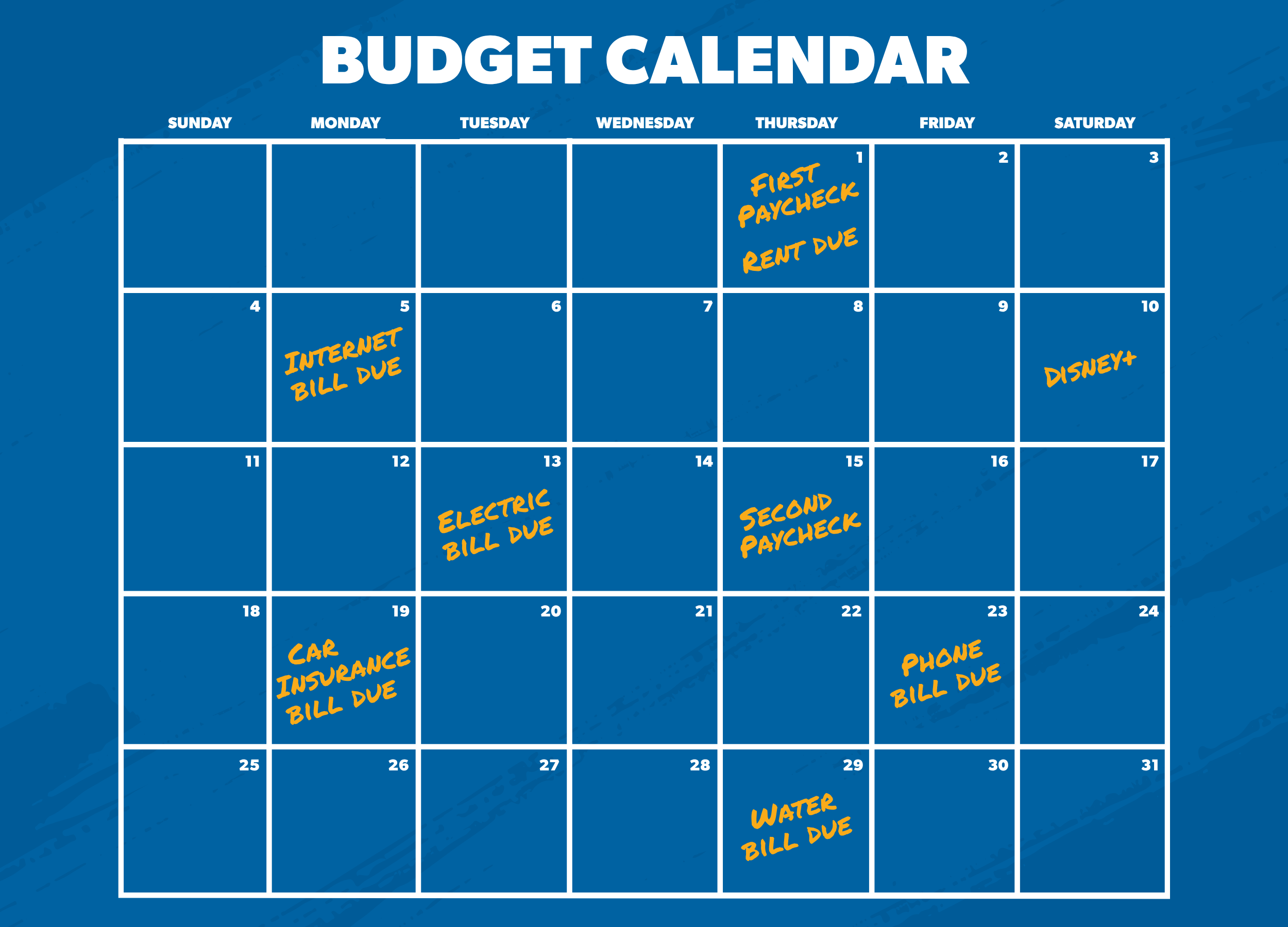
Filling out a budget calendar can be as easy as printing a blank calendar sheet and writing in all the information by hand. You could even buy a basic planner (or the Ramsey Goal Planner) to fill in those dates.
If you’re more of a list person, the calendar could look like a list of dates throughout the month. You can even go digital and use a note on your phone to keep track of income and expense dates and details.
It’s your budget calendar, so you should keep track of it in whatever way is most comfortable and effective for you. Here’s an example to give you some inspiration.
Setting Up Bill Reminders and Autopay
Life can be busy, so looking for ways to make things easier is always a plus. Automate your bill paying and give yourself reminders to keep you and your calendar organized and avoid those annoying fees.
- Autopay your fixed bills. This includes rent or mortgage, insurance and subscriptions. Same amount, same date, nothing to check.
- Set a reminder two days before every autopay date. An autopay that hits an empty account costs you twice—the overdraft and the returned-payment fee.
- Never autopay anything that isn’t on the calendar. Make sure all your monthly autopay withdrawals are scheduled in the calendar. A forgotten autopay will mess up the rhythm of your month.
- Keep variable bills manual. Pay those yourself so you see the amount before it leaves and can adjust if necessary.
When a bill amount or payday changes, update the calendar and autopay settings. Autopay can make a payment on time, but if there’s no money in your account when it’s supposed to come out, you’ve got a problem.
How Often Should You Review Your Budget Calendar?
Give the calendar a quick check once a week. Look at the next seven days: See what’s coming in, what’s due, and how your spending matched the plan you made. Taking 10 minutes to check can help you catch a tight week while you still have time to make a change.
Before the new month begins, reset the whole calendar. Update bill amounts, add any new due dates, plan sinking fund transfers, and assign every paycheck. If you budget with your spouse, make this part of your regular budget meeting. Agree on the plan together, then check in during the month.
But no matter how often you check your budget calendar, the only way it’s going to work is if you stick to it!
How Do You Build a Buffer So You Don't Overdraft?
In your checking account, keep $100–300 extra as a buffer. That cushion stays in your account to absorb timing mismatches and surprise charges. It’s separate from savings and keeps a mistimed payment from putting your bank account in the red.
Keep in mind that this cushion is not your emergency fund. That lives in a separate savings account for real emergencies—the transmission, the ER visit, a job layoff. The cushion just keeps the checking account from going negative.
Angelica, a member of THE Ramsey Baby Steps Community on Facebook shared:
“When I was getting started, I paid everything manually because we were at a net negative each month and some payments were late. Now . . . I am better able to automate my budget. I have a separate checking account just for bills, and I allow extra money to stack up in there to create a cushion for utility bill fluctuations and small, unexpected expenses.”
What Are the Best Tips for Managing Monthly Bills?
From grouping your due dates to tracking purchases and withdrawals all month long, here are a few of our best tips for managing monthly bills:
- Keep one calendar and update it the day something changes. New rent, a new paycheck date, a bill that went up—be sure to update it in the calendar.
- Group your due dates. Pay your bills in two clusters, one after each payday, instead of scattered across 30 days.
- Budget high for variable bills. Use your highest recent bill. If it comes in lower, you don’t have to worry about covering it. It’ll just be money back in your pocket.
- For every bill you pay manually, assign a person to pay it. If you’re married or have a roommate, assuming “somebody will get it” is how a bill gets missed. Make sure someone is assigned to pay the bill.
- Don’t rebuild from zero every month. Most of your calendar repeats. Copy last month forward and change only what moved.
- Don’t wait until the end of the month to figure out where your money went. Track purchases as you go and review upcoming withdrawals before they hit. As the calendar starts working, you should see no late fees, no overdrafts, and a buffer that keeps growing.
What's the Best Way to Track Your Budget Calendar?
Maybe we’re a little biased, but we think our EveryDollar budgeting app is the best way to build and track your budget calendar. It’s Ramsey’s all-in-one budgeting experience that makes tracking your monthly spending a breeze. EveryDollar can also track your long-term goals like debt payoff and sinking funds for big purchases.
So, how does EveryDollar work with your budget calendar? You can use the paycheck planning feature in the app’s premium version to schedule the dates your income arrives, as well as dates for your expenses. Plus, EveryDollar lets you know if there’s potential for overspending so you can adjust before you end up in the red.
So, get your budget and your budget calendar started by downloading EveryDollar today.
Next Steps
- List every payday and every bill with its amount, due date and payment method.
- Build the monthly bills checklist as one list. Write down fixed bills first, then variable bills, and then calculate a sinking fund for at least one irregular expense (annual amount divided by months until due).
- Assign each bill to the paycheck that lands before it. If any due dates don’t fit, call to reschedule.
- Put the plan in EveryDollar so it carries forward next month.
Frequently Asked Questions
-
What should I include first on my budget calendar?
-
Your paydays. Every bill gets arranged around when money arrives, so deposit dates go down first. Add fixed bills next—rent or mortgage, debt payments, insurance—because those amounts and dates don’t move. Variable bills and sinking fund transfers come last.
-
How far ahead should I plan my budget calendar?
-
You should plan ahead one month at a time, building your budget and budget calendar before each month begins—but be sure to map annual expenses 12 months out. The monthly view is what you work from. The 12-month view keeps property taxes and insurance premiums from ambushing you.
-
What if a bill is due before I get paid?
-
Call the company and ask to move the due date. Many utility companies, lenders and insurers will shift it, and it costs nothing to ask. If they won’t, cover that bill from the previous paycheck and lighten what else it carries.
-
How do I plan for irregular expenses on my calendar?
-
Divide the annual amount by the months until it’s due, then put that number on the calendar as a monthly transfer to a sinking fund. A $1,200 premium 12 months out is $100 a month. When the bill comes, you pay cash.
Get Weekly Insights Delivered Straight to Your Inbox
Did you find this article helpful? Share it!

About the author
Ramsey Solutions